The Ultimate Guide to Timeline Templates: Create Professional Timelines in Minutes
Last updated: December 2024
Introduction
Timeline templates are essential tools for visualizing events, processes, and project milestones in a clear, engaging format. Whether you're planning a wedding, managing a complex project, or creating a presentation, the right timeline template can transform confusing data into compelling visual stories. In this comprehensive guide, we'll explore everything you need to know about timeline templates and how to use them effectively.
With tools like Ainfographic, you can create stunning timeline infographics, project roadmaps, and visual schedules in minutes—no design experience required.
Table of Contents
What is a Timeline Template?
A timeline template is a pre-designed framework that allows you to organize and display chronological information visually. These templates provide a structured format where you can input dates, events, and milestones, instantly creating professional-looking timelines without starting from scratch.
Timeline templates come in various formats including PowerPoint slides, Excel spreadsheets, Word documents, and specialized design software files. They range from simple linear timelines to complex Gantt charts and multi-layered project roadmaps.
Types of Timeline Templates
Wedding Timeline Templates
Wedding timeline templates are specifically designed for planning every detail of your special day, from getting ready in the morning to the last dance at reception. These templates help coordinate vendors, manage schedules, and ensure nothing is overlooked.
PowerPoint Timeline Templates
PowerPoint timeline templates integrate seamlessly into presentations, making them perfect for business meetings, academic presentations, and project proposals. They're designed to be visually striking while maintaining professional aesthetics.
Project Timeline Templates
Project timeline templates focus on task management and milestone tracking. They often include features like progress indicators, resource allocation, and dependency mapping, making them ideal for project managers and team leaders.
Blank Timeline Templates
Blank timeline templates offer maximum flexibility, allowing you to customize every aspect according to your specific needs. These are perfect when existing templates don't quite fit your requirements.
Why Use Timeline Templates?
Time Savings
Time savings represent the most immediate benefit. Instead of spending hours designing a timeline from scratch, you can have a professional-looking result in minutes. This efficiency is crucial when facing tight deadlines or managing multiple projects.
Consistency
Consistency across your documents and presentations becomes effortless when using templates. Whether you're creating a series of project updates or multiple event timelines, templates ensure a cohesive visual identity.
Professional Appearance
Professional appearance is guaranteed with well-designed templates. Even if you lack design skills, templates provide polished, visually appealing results that enhance your credibility and communication effectiveness.
Improved Collaboration
Collaboration improves when team members work from the same template structure. Everyone understands the format, making it easier to share information and maintain unified documentation.
How to Choose the Right Timeline Template
Consider your purpose first. Are you tracking a project, planning an event, or presenting historical information? Different goals require different template styles and features.
Evaluate customization options. The best templates balance pre-designed elements with flexibility. Look for templates that allow you to adjust colors, fonts, and layouts while maintaining structural integrity.
Assess compatibility with your tools. Ensure the template works with software you already use, whether that's Microsoft Office, Google Workspace, or specialized design applications like Ainfographic.
Check for scalability. Your timeline might start simple but grow complex. Choose templates that can accommodate additional information without becoming cluttered or losing readability.
Best Practices for Using Timeline Templates
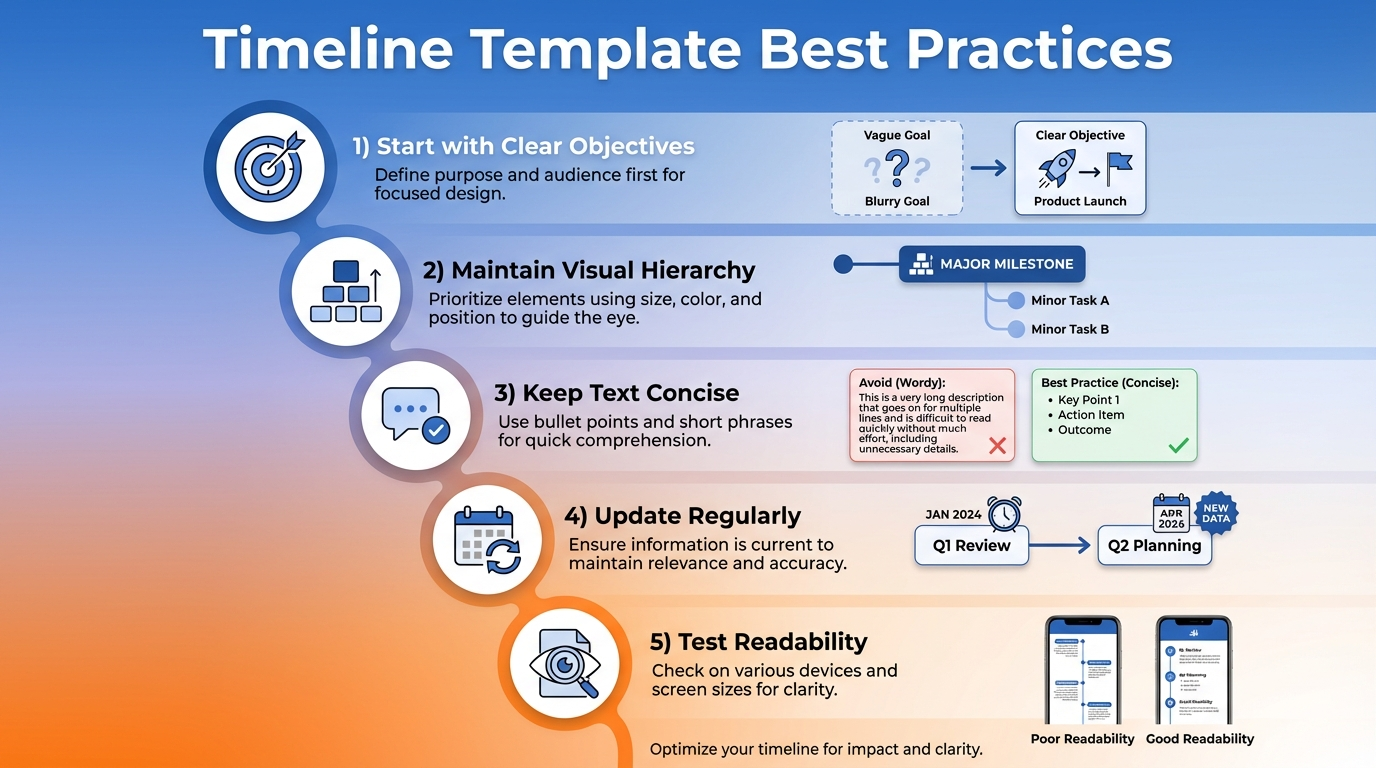
Start with Clear Objectives
Start with clear objectives before filling in your template. Know what story you're telling and what information is essential versus nice-to-have.
Maintain Visual Hierarchy
Maintain visual hierarchy by emphasizing important milestones and dates while keeping supporting information subtle. Use size, color, and positioning to guide viewers' attention.
Keep Text Concise
Keep text concise. Timeline templates work best with brief, punchy descriptions. Save detailed explanations for accompanying documents or presentations.
Update Regularly
Update regularly to keep your timeline relevant and accurate. Outdated timelines can undermine credibility and lead to confusion.
Test Readability
Test readability by sharing your timeline with someone unfamiliar with the project. If they can understand the sequence and key points quickly, you've succeeded.
Where to Find Quality Timeline Templates
Ainfographic
Ainfographic offers intelligent timeline creation tools that help you build professional timelines, flowcharts, and infographics in minutes. With AI-powered design suggestions and customizable templates, you can create stunning visual timelines without any design experience.
Microsoft Office and Google Workspace
Microsoft Office and Google Workspace offer built-in template galleries with numerous timeline options. These are reliable, free, and integrate perfectly with their respective ecosystems.
Design Platforms
Design platforms like Canva, Visme, and Adobe Express provide both free and premium timeline templates with extensive customization capabilities.
Specialized Project Management Tools
Specialized project management tools such as Asana, Monday.com, and Trello include timeline views and templates designed specifically for project tracking.
Template Marketplaces
Template marketplaces like Creative Market and Envato Elements offer premium designs created by professional designers, ideal when you need something truly unique.
Common Timeline Template Mistakes to Avoid
Overcrowding
Overcrowding is the most frequent error. Trying to fit too much information makes timelines illegible and defeats their purpose of simplifying complex information.
Inconsistent Formatting
Inconsistent formatting confuses viewers. Maintain uniform styling for similar elements throughout your timeline.
Ignoring Your Audience
Ignoring your audience's needs leads to ineffective communication. Technical stakeholders might need different information than executive audiences.
Neglecting Mobile Responsiveness
Neglecting mobile responsiveness becomes problematic when timelines are shared digitally. Ensure your template works across devices and screen sizes.
Conclusion
Timeline templates are powerful tools that transform how we communicate chronological information. By choosing the right template and following best practices, you can create compelling visual narratives that inform, persuade, and engage your audience.
Whether you're planning a wedding, managing a project, or presenting historical data, there's a perfect timeline template waiting to bring your story to life. Start exploring options today and discover how much easier organizing and presenting temporal information can be.
Ready to Create Your Timeline?
Create professional timelines, flowcharts, and infographics in minutes with Ainfographic. No design experience required!
Try Ainfographic Free