Timeline Maker Tools: Create Stunning Visual Timelines Online for Free
Last updated: December 2024
Introduction
Creating compelling visual timelines has never been easier thanks to modern timeline maker tools. Whether you're a student researching historical events, a project manager tracking milestones, or a marketer visualizing campaign schedules, the right timeline maker can transform complex chronological data into clear, engaging visual stories.
This comprehensive guide explores the best timeline maker tools available today, with a special focus on free options that deliver professional results. Discover how Ainfographic and other top tools can help you create beautiful timelines in minutes.
Table of Contents
What is a Timeline Maker?
A timeline maker is a digital tool designed to help users create visual representations of chronological information. These applications range from simple drag-and-drop interfaces to sophisticated platforms with advanced customization capabilities.
Modern timeline makers typically operate online, eliminating the need for software downloads and enabling access from any device with internet connectivity. This cloud-based approach also facilitates collaboration, allowing multiple users to work on the same timeline simultaneously.
The evolution of timeline makers reflects broader trends in design democratization. What once required professional design skills and expensive software can now be accomplished by anyone with a web browser and a story to tell.
Top Free Timeline Maker Tools
Ainfographic
Ainfographic stands out as an intelligent timeline creation tool that combines ease of use with professional results. Using AI-powered design suggestions, it helps you create timelines, flowcharts, and infographics in minutes—no design experience required.
Key features include customizable templates, drag-and-drop functionality, export options for various formats, and the ability to create not just timelines but also flowcharts and other visual content types.
Canva Timeline Maker
Canva Timeline Maker stands out for its user-friendly interface and extensive template library. With thousands of free templates and design elements, Canva makes creating beautiful timelines accessible to users of all skill levels. The drag-and-drop interface feels intuitive, while the platform's collaboration features enable team-based timeline creation.
TimelineJS
TimelineJS is an open-source tool that's particularly popular in journalism and education. It excels at creating media-rich timelines that incorporate images, videos, and external links. The tool reads data from Google Sheets, making it easy to update and maintain even complex timelines with numerous entries.
Visme
Visme offers a robust free plan that includes timeline creation capabilities alongside other visualization tools. Its strength lies in balancing ease of use with professional design options, making it suitable for both quick projects and more polished presentations.
Tiki-Toki
Tiki-Toki provides a unique three-dimensional timeline view that adds depth and engagement to chronological storytelling. While the free version has limitations, it offers enough functionality for most personal and educational projects.
Office Timeline
Office Timeline is a PowerPoint add-in that seamlessly integrates timeline creation into familiar presentation software. This integration makes it particularly appealing for business users who already work extensively in PowerPoint.
Key Features to Look for in Timeline Makers
Template Variety
Template variety determines how quickly you can start and how polished your final product looks. The best timeline makers offer templates for various use cases—historical timelines, project roadmaps, event planning, and more.
Customization Options
Customization options separate adequate tools from exceptional ones. Look for timeline makers that allow you to adjust colors, fonts, layouts, and spacing to match your brand or personal preferences.
Data Import/Export
Data import/export capabilities streamline workflow significantly. Tools that work with spreadsheets or allow easy data updates save countless hours when managing complex timelines.
Collaboration Features
Collaboration features become essential for team projects. Real-time editing, commenting, and version control ensure smooth collaboration without confusion.
Export Formats
Export formats affect how you can use your finished timeline. Quality tools offer multiple export options including PDF, PNG, PowerPoint, and sometimes even interactive HTML versions.
Mobile Responsiveness
Mobile responsiveness matters increasingly in our multi-device world. Ensure your chosen timeline maker works well on tablets and smartphones if you'll be accessing or presenting from these devices.
Creating Different Types of Timelines
History Timeline Makers
History timeline makers serve educators, students, and history enthusiasts creating chronological narratives of historical events. These timelines benefit from rich media integration—photos of historical figures, maps showing territorial changes, and primary source documents add context and engagement.
Project Timeline Makers
Project timeline makers focus on task management and milestone tracking. They often include features like progress indicators, resource allocation views, and dependency mapping. These timelines help project managers communicate schedules clearly and track progress visually.
Event Timeline Makers
Event timeline makers help plan weddings, conferences, festivals, and other events. They typically emphasize clear time slots, venue information, and participant details, ensuring everyone knows what's happening when.
Personal Timeline Makers
Personal timeline makers let individuals document life stories, career progressions, or personal achievements. These timelines often emphasize photos and personal narratives, creating visual autobiographies that can be shared with family and friends.
Step-by-Step: Creating Your First Timeline
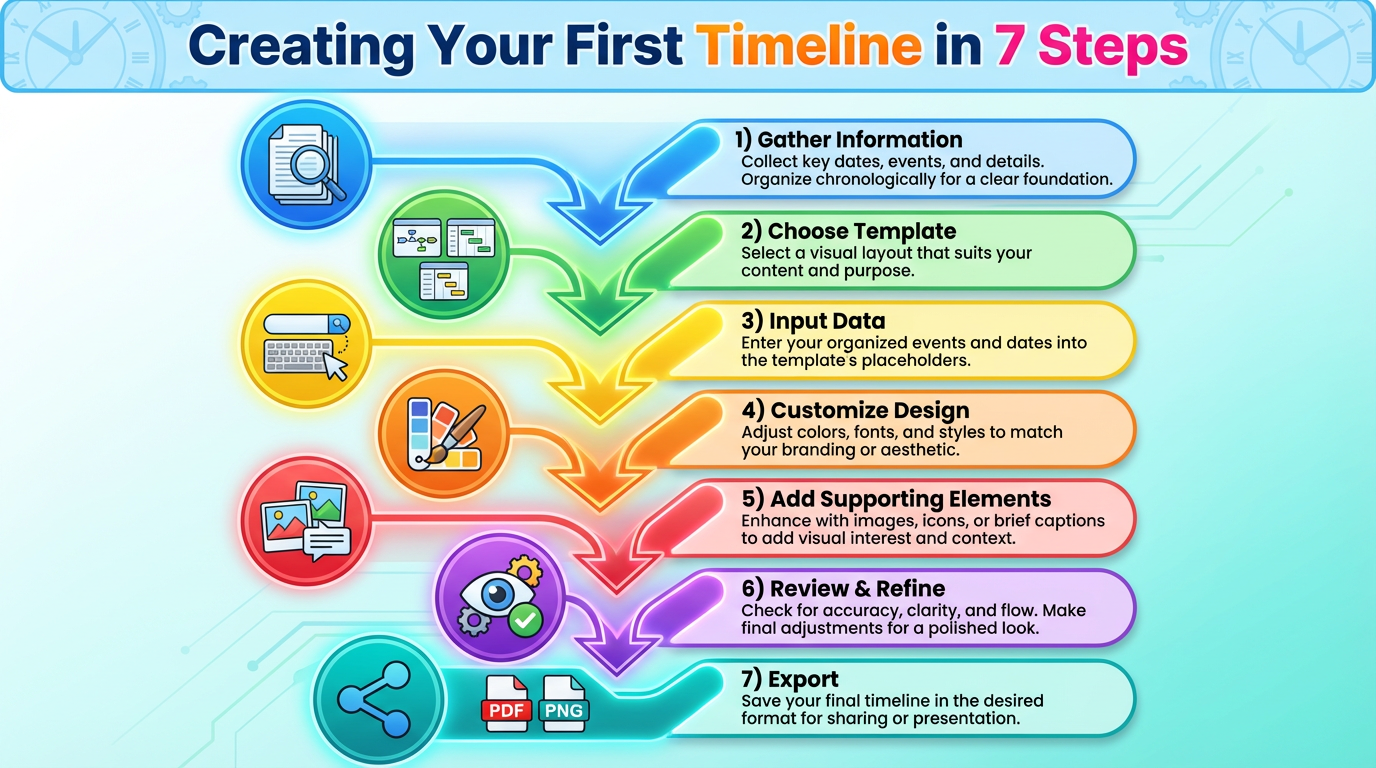
1. Gather Your Information
Start by gathering your information. List all events, dates, and relevant details before touching the timeline maker. This preparation ensures you don't get caught up in design decisions before clarifying content.
2. Choose a Template
Choose an appropriate template that matches your timeline's purpose and complexity. Don't be afraid to preview multiple templates before committing—the right foundation makes subsequent steps much easier.
3. Input Your Data
Input your data systematically, working chronologically or by importance depending on your timeline's structure. Most timeline makers let you add entries and rearrange them later, so don't worry about perfect sequencing initially.
4. Customize the Design
Customize the design to match your needs. Adjust colors to reflect your brand or personal preferences, modify fonts for readability, and tweak spacing to ensure clarity. Remember that simpler designs often communicate more effectively than cluttered, overly stylized versions.
5. Add Supporting Elements
Add supporting elements like images, icons, or additional text boxes that provide context without overwhelming the main timeline narrative. These elements should enhance understanding, not distract from the chronological story.
6. Review and Refine
Review and refine by stepping back from your work and viewing it with fresh eyes. Better yet, show it to someone unfamiliar with your content and see if they can follow the timeline without explanation.
7. Export
Export in your preferred format, considering where and how the timeline will be used. Interactive timelines work wonderfully online but may not translate well to print, while static image exports ensure consistent appearance across platforms.
Professional Timeline Design Tips
Maintain Consistent Visual Language
Maintain consistent visual language throughout your timeline. Use the same color scheme for similar types of events, consistent icon styles, and uniform spacing between elements.
Prioritize Readability
Prioritize readability over decoration. Fancy fonts and elaborate graphics might look impressive but can hinder comprehension. Choose clarity every time you face design decisions.
Use White Space Strategically
Use white space strategically to prevent your timeline from feeling cramped. Adequate spacing between events helps viewers process information and makes your timeline feel more polished.
Establish Clear Visual Hierarchy
Establish clear visual hierarchy by emphasizing important milestones while keeping supporting details subtle. Size, color, and positioning all communicate relative importance.
Consider Your Audience
Consider your audience's familiarity with the subject matter. Timelines for expert audiences can use more specialized terminology and assume more background knowledge than those intended for general audiences.
Test Across Devices
Test across devices if your timeline will be viewed digitally. What looks perfect on your desktop monitor might be illegible on a smartphone screen.
Free vs. Paid Timeline Maker Features
Understanding the limitations of free timeline makers helps set realistic expectations and determine whether upgrading is worthwhile.
Project Limits
Free versions typically restrict the number of timelines you can create, often limiting users to 3-5 projects. For occasional users, this suffices, but frequent timeline creators quickly encounter these limits.
Export Options
Export options in free versions are usually limited. You might only get low-resolution images or watermarked exports, while paid versions offer high-resolution files and multiple formats without branding.
Template Access
Template access varies significantly. Free plans might include basic templates, while premium plans unlock hundreds of professionally designed options.
Collaboration Features
Collaboration features are often restricted in free versions, limiting the number of collaborators or disabling real-time editing capabilities.
Storage Limitations
Storage limitations mean free accounts might have restrictions on timeline length, number of events, or file upload sizes for images and media.
For most personal and educational uses, free timeline makers provide ample functionality. Business and professional users might find paid versions worth the investment for advanced features and commercial usage rights.
Timeline Maker Use Cases Across Industries
Education
Education sector relies heavily on timeline makers for teaching history, science progression, literary chronology, and more. Interactive timelines engage students more effectively than traditional text-based chronologies.
Business and Project Management
Business and project management use timelines for project planning, product roadmaps, company milestone documentation, and strategic planning visualization.
Marketing
Marketing teams create campaign timelines, content calendars, and product launch schedules, ensuring all team members understand the sequence and timing of activities.
Legal
Legal profession uses timelines to organize case evidence, document event sequences, and present chronologies to juries in clear, compelling formats.
Personal Use
Personal use spans family history documentation, wedding planning, travel itineraries, career progression visualization, and goal achievement tracking.
Common Timeline Maker Mistakes and Solutions
Information Overload
Information overload is the most frequent error. Trying to include every detail makes timelines overwhelming and defeats their purpose. Solution: Be selective. Include only essential information and use linked resources for details.
Poor Date Formatting
Poor date formatting creates confusion, especially when mixing date formats or using ambiguous labels. Solution: Choose one consistent date format and stick with it throughout.
Inconsistent Design
Inconsistent design language makes timelines look amateurish and harder to follow. Solution: Establish style guidelines at the start and apply them rigorously.
Ignoring Mobile Viewing
Ignoring mobile viewing results in timelines that work beautifully on desktop but are illegible on phones. Solution: Always preview your timeline on multiple devices before finalizing.
Not Updating Timelines
Not updating timelines after changes makes them outdated and unreliable. Solution: Schedule regular reviews and updates, especially for project timelines tracking ongoing work.
Conclusion
Timeline makers have revolutionized how we create and share chronological information. With powerful free tools now available to everyone, creating professional-quality timelines no longer requires design expertise or expensive software.
Whether you're documenting history, managing projects, or planning events, the right timeline maker can help you communicate complex temporal information clearly and engagingly. Start exploring these tools today and discover how visual timelines can enhance your storytelling, teaching, and planning capabilities.
Create Your Timeline Today
Try Ainfographic and create professional timelines, flowcharts, and infographics in minutes—no design experience required!
Start Creating Free