Infographic Resume Guide: Stand Out with Visual Resume Templates
Last updated: December 2024
Introduction
In competitive job markets where recruiters spend an average of 7 seconds scanning each resume, standing out from hundreds of applicants requires innovation. Infographic resumes leverage visual design principles to capture attention, communicate qualifications quickly, and showcase creativity that traditional text-heavy formats cannot match.
This comprehensive guide explores when, why, and how to create infographic resumes that land interviews while avoiding common pitfalls that could derail your job search. Learn how to create stunning visual resumes with tools like Ainfographic that help you design professional resumes in minutes.
Table of Contents
What is an Infographic Resume?
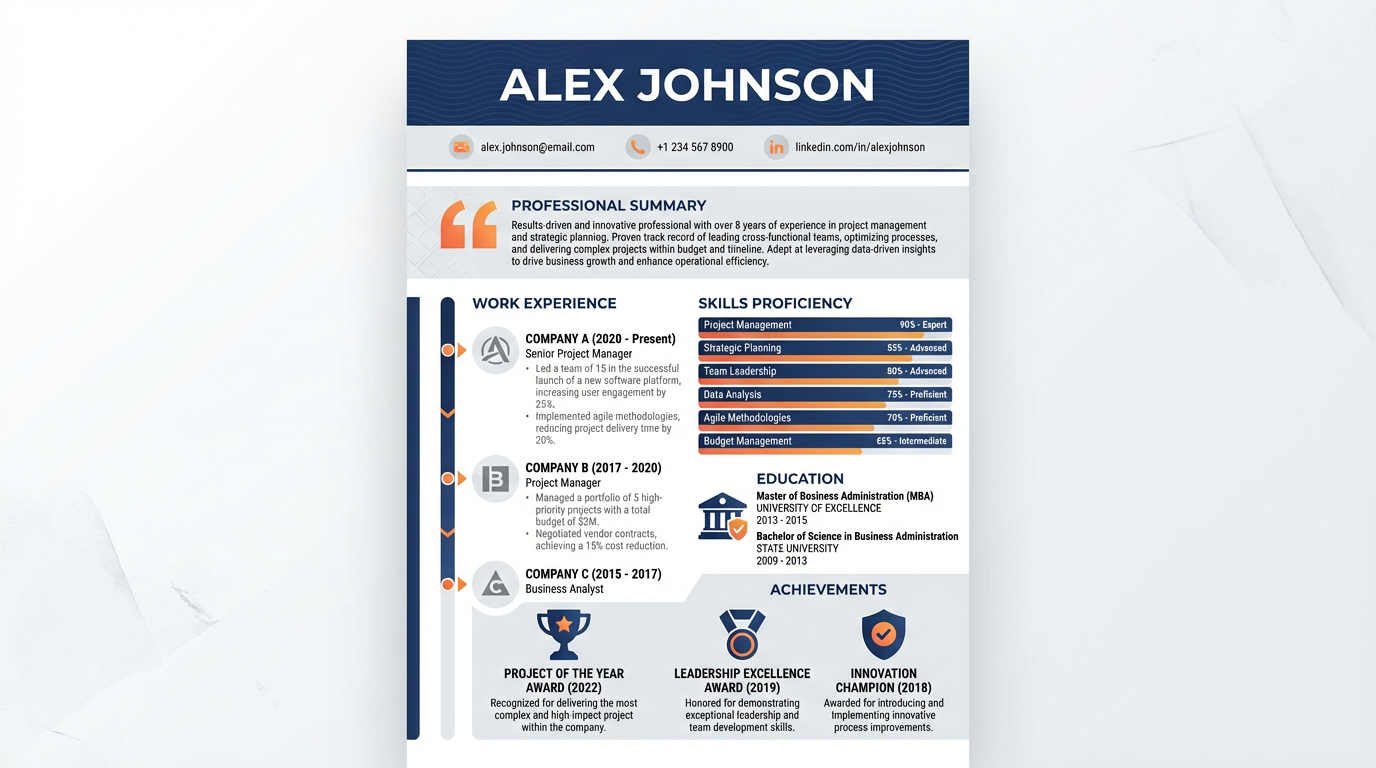
An infographic resume uses visual elements—charts, graphs, icons, timelines, and strategic design—to present your qualifications in a highly visual format. Unlike traditional resumes that rely primarily on text formatted in straightforward lists, infographic resumes integrate data visualization and graphic design to create memorable impressions.
These resumes transform standard resume sections into visual stories. Employment history becomes a timeline with visual markers for key achievements. Skills are represented through charts showing proficiency levels. Education includes institutional logos and visual degree representations. The overall effect creates a document that's simultaneously informative and engaging.
Infographic resumes aren't universally appropriate, but when used correctly in suitable industries and roles, they demonstrate creativity, design sensibility, and communication skills that text-only documents cannot convey.
When to Use an Infographic Resume
Creative Industries
Creative industries represent ideal territory for infographic resumes. Graphic design, marketing, advertising, content creation, and digital media roles often welcome or even expect visual resume presentations. In these fields, your resume itself becomes a portfolio piece demonstrating design capabilities.
Startup and Tech Companies
Startup and tech company cultures frequently appreciate innovative approaches to traditional formats. Companies emphasizing innovation and disruption often view creative resumes favorably, seeing them as evidence of thinking outside conventional boundaries.
Junior to Mid-Level Positions
Junior to mid-level positions benefit most from infographic resumes. Entry-level candidates with limited experience can use visual formats to highlight skills, education, and potential rather than sparse work histories. Mid-level professionals can visualize career progression and growing expertise compellingly.
Industry Events and Networking
Industry events and networking situations provide excellent opportunities for infographic resumes. When competing with dozens of candidates at career fairs or industry conferences, memorable visual resumes help recruiters remember you among the crowd.
Online Portfolios
Online portfolios and personal websites integrate infographic resumes seamlessly. Digital presentations allow for colors, graphics, and designs that might not translate well to print, making online versions ideal for maximizing visual impact.
When to Avoid Infographic Resumes
Traditional Industries
Traditional industries like law, finance, healthcare, and government typically expect conventional resume formats. Submitting infographic resumes to conservative industries can signal poor judgment about professional norms.
Senior Executive Positions
Senior executive positions demand traditional formats demonstrating gravitas and extensive experience. Infographic resumes might appear too casual or gimmicky for C-suite and senior leadership roles.
Applicant Tracking Systems (ATS)
Applicant Tracking Systems (ATS) represent the biggest challenge for infographic resumes. Most ATS software cannot parse visual elements, meaning beautifully designed resumes might be entirely unreadable to the systems that initially screen applications. If you're applying through online systems requiring uploaded resumes, assume ATS screening and prepare traditional text-based versions.
Technical Expertise Roles
Positions emphasizing technical expertise over creativity generally prefer straightforward presentations of qualifications. Engineering roles, data science positions, and academic jobs typically value content over presentation style.
International Applications
International applications require caution with visual resumes. Different cultures have varying expectations about resume formats, and what impresses in one country might seem inappropriate in another.
Key Elements of Effective Infographic Resumes
Contact Information
Contact information must remain prominent and easy to locate despite visual treatments. Name should be the largest text element, clearly readable at a glance. Contact details including email, phone, LinkedIn profile, and portfolio URLs need consistent positioning where viewers expect to find them.
Professional Summary
Professional summary or value proposition deserves visual emphasis as the first content viewers encounter. This 2-3 sentence statement articulating your professional identity and unique value should be clearly separated from other sections, potentially using different background colors or border treatments.
Work Experience Timeline
Work experience timeline visualization transforms standard job listings into engaging visual narratives. Timeline formats show career progression at a glance, with positions marked along the timeline and key achievements highlighted at each role. Icons or logos representing companies add visual interest while facilitating quick scanning.
Skills Visualization
Skills visualization might include bar charts showing proficiency levels, word clouds emphasizing most developed skills, or rating systems indicating expertise. These visual representations communicate competencies faster than text lists while adding personality to your presentation.
Education Section
Education section can incorporate institutional colors and logos, visually differentiate degrees and certifications, and use icons representing academic achievements like honors or relevant coursework.
Achievements and Metrics
Achievements and metrics deserve special visual treatment. Numbers and quantifiable accomplishments can be pulled out as callout boxes, featured in bold fonts, or represented through icons, ensuring they capture attention immediately.
Color Scheme
Color scheme selection impacts overall impression significantly. Choose 2-3 colors that complement each other, reflect your personal brand or target industry aesthetic, and maintain sufficient contrast for readability. Avoid overwhelming palettes that distract from content.
White Space
White space remains crucial even in visually rich documents. Strategic use of empty space prevents overwhelming viewers, guides eyes through information logically, and conveys sophistication rather than amateurish crowding.
Create Your Visual Resume
Design a professional infographic resume with Ainfographic. Choose from templates, customize with your information, and export in multiple formats.
Creating Your Infographic Resume: Step-by-Step
1. Start with Traditional Content
Start with traditional resume content by drafting a standard text-based resume first. This ensures you've thoughtfully articulated your experience, achievements, and qualifications before focusing on visual presentation. Strong content remains paramount regardless of format.
2. Choose Appropriate Templates
Choose appropriate templates from design platforms like Ainfographic, Canva, Visme, or Adobe Spark offering infographic resume templates. These provide professional frameworks ensuring good design principles even without extensive design experience.
3. Map Content to Visual Elements
Map content to visual elements by determining which resume sections benefit most from visualization. Employment history works well as timelines, skills as charts, education as credential displays with logos, and achievements as highlighted callout boxes.
4. Design with Hierarchy
Design with hierarchy in mind, ensuring most important information (name, contact details, current role, key achievements) receives visual emphasis through size, color, or positioning. Secondary information should be accessible but not competing for primary attention.
5. Maintain Consistency
Maintain consistency in fonts, colors, icon styles, and spacing throughout the document. Inconsistent design elements appear amateurish and distract from qualifications.
6. Optimize for Multiple Formats
Optimize for multiple formats by creating versions for different purposes: a full-color digital version for online portfolios and email, a print-friendly version with appropriate color profiles, and critically, a traditional text-based version for ATS systems.
7. Test Readability
Test readability by showing drafts to others and asking if they can quickly identify your current role, key qualifications, and contact information. If viewers need more than 10 seconds to grasp your basic qualifications, simplify the design.
8. Proofread Meticulously
Proofread meticulously since design elements increase the number of things that can go wrong. Check spelling, grammar, dates, alignment, and visual consistency. Errors become more glaring in well-designed documents.
Best Infographic Resume Templates and Tools
Ainfographic
Ainfographic offers intelligent resume template creation with AI-powered design suggestions. Create professional visual resumes, infographics, and flowcharts with drag-and-drop functionality and customizable templates designed specifically for job seekers.
Canva
Canva offers hundreds of free and premium infographic resume templates with drag-and-drop editing. The platform's ease of use makes it accessible to non-designers while offering enough customization for creating distinctive results.
Visme
Visme provides specifically designed resume templates with built-in data visualization tools, making it easy to create professional skills charts and timeline representations.
Adobe Spark
Adobe Spark targets creatives with design-forward templates and seamless Adobe Creative Cloud integration, ideal for those already working in Adobe ecosystems.
NovoResume
NovoResume specializes in modern resume design with both traditional and visual formats, offering templates that balance creativity with ATS compatibility.
Resume.io
Resume.io combines infographic elements with traditional formats, creating hybrid approaches that capture attention while maintaining scannability.
Infographic Resume Dos and Don'ts
DO's
- DO prioritize readability over visual flair. If recruiters can't quickly extract your qualifications, the most beautiful design fails its purpose.
- DO maintain professional tone despite creative format. Infographic resumes should showcase creativity while preserving professional credibility.
- DO include quantifiable achievements with visual emphasis. Numbers demonstrating your impact deserve highlighting through callout boxes or special formatting.
- DO create multiple versions for different purposes, ensuring you have appropriate formats for any application scenario.
- DO research target company culture before sending infographic resumes, confirming visual approaches align with organizational values.
DON'Ts
- DON'T sacrifice content for style. Every visual element should serve a purpose, either communicating information more effectively or guiding attention to important details.
- DON'T use infographic resumes as your only format. Always have a traditional version ready for ATS systems and conservative industries.
- DON'T include photos unless they're industry-appropriate and legally acceptable in your location. Many regions prohibit photos on resumes to prevent discrimination.
- DON'T overuse colors and graphics to the point of distraction. Sophisticated design often means restraint, not maximalist decoration.
- DON'T forget mobile optimization. Many recruiters review resumes on smartphones, so test how your visual resume appears on small screens.
Overcoming ATS Challenges with Infographic Resumes
The Applicant Tracking System problem remains the biggest challenge for infographic resumes. Most ATS software cannot parse visual elements, meaning your carefully designed resume might appear as unintelligible garbage to the screening system.
The Hybrid Approach
The hybrid approach offers the best solution: create both an ATS-friendly traditional resume and an infographic version. Use the traditional format when applying through online systems and the infographic version for networking, portfolio inclusion, and post-interview leave-behinds.
Semi-Visual Formats
Some platforms now offer semi-visual formats with enough text structure for ATS parsing while incorporating design elements. These compromise formats won't be as visually striking as full infographic resumes but increase chances of passing automated screening.
Direct Applications
Direct applications to hiring managers bypass ATS systems entirely. When possible, email your application directly or hand-deliver it at networking events, allowing you to use your infographic resume without ATS concerns.
Include Both Versions
Including a text version alongside visual presentations hedges your bets. Some systems allow multiple file uploads; include both versions to ensure nothing is lost in automated screening.
Infographic Resume Success Stories
Marketing Coordinator Position
A candidate with minimal experience created an infographic resume visualizing her coursework projects, volunteer social media management, and personal blog metrics. The visual format demonstrated the very marketing skills she was applying to use professionally, landing interviews at three agencies.
Graphic Designer Role
An applicant created an infographic resume that was itself a portfolio piece, demonstrating typography skills, color theory understanding, and layout competency. The resume secured the interview; the portfolio sealed the job offer.
Tech Startup Application
A product manager candidate used an infographic resume at a startup career fair, standing out among hundreds of traditional resumes. The visual format caught a hiring manager's attention long enough to initiate a conversation that ultimately led to an offer.
Career Change Professional
Someone transitioning from teaching to instructional design created an infographic resume emphasizing transferable skills through visual comparison charts. The format helped recruiters see connections between teaching experience and corporate training roles that weren't obvious in traditional resume formats.
Conclusion
Infographic resumes represent powerful tools in the right circumstances—creative industries, visual roles, networking situations, and online portfolios. When designed thoughtfully, they capture attention, communicate qualifications memorably, and demonstrate creativity that text alone cannot convey.
However, success requires understanding their limitations, particularly regarding ATS systems, and knowing when traditional formats serve you better. By creating both infographic and traditional versions, researching target company cultures, and prioritizing content over pure aesthetics, you can leverage visual resumes to enhance your job search without the pitfalls that derail poorly executed attempts.
Your resume, whether traditional or infographic, remains a tool for securing interviews—choose the format that best showcases your qualifications while respecting industry norms and application systems.
Create Your Infographic Resume
Stand out from the competition with a professional infographic resume. Use Ainfographic to create stunning visual resumes in minutes.
Design Your Resume Now